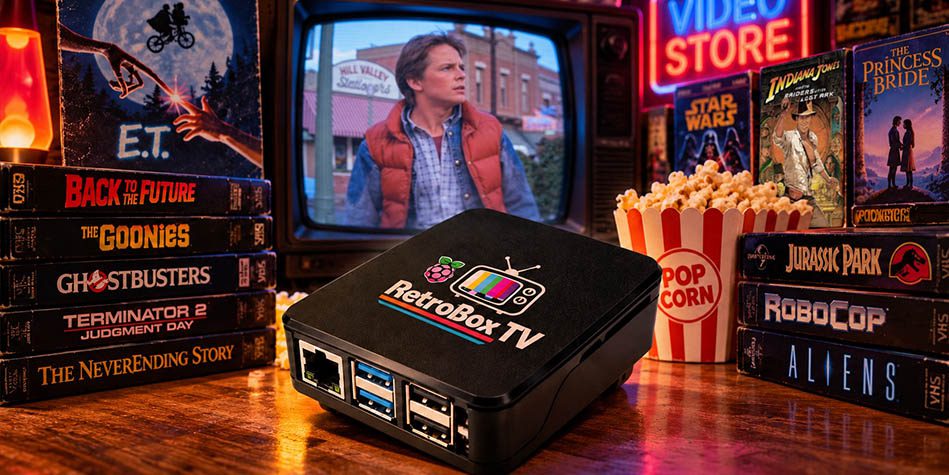
I built something called RetroBox TV.
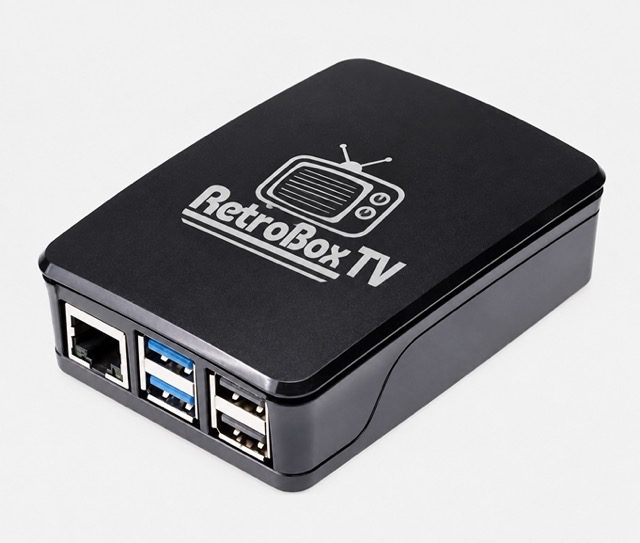
It’s my own miniature television network using a Raspberry Pi. The entire thing runs from a 128GB memory card, fits comfortably in my pocket and even works with a normal TV remote.
But calling it a media player doesn’t really explain what it is.
I wanted to recreate the experience of watching television in the 80s and 90s. Not just the programmes, but everything surrounding them. The commercials, the presenters, the channel logos, the music videos, the strange little animations between shows and that wonderful feeling of not knowing what was going to be on next.
And somehow, what started as a little experiment became one of the biggest personal projects I’ve ever taken on.
Remember When You Couldn’t Just Watch Anything?
These days, we have streaming services with thousands of shows available whenever we want. Yet somehow, we can spend half an hour scrolling through everything and still find nothing to watch.
Growing up, television was different.
You switched it on and watched whatever was showing. Sometimes you caught an episode halfway through. Sometimes you missed the beginning of a movie. You’d switch channels during commercials and suddenly discover something you’d completely forgotten about.
And if you missed something, tough luck. Unless you recorded it on VHS, it was gone.
That’s exactly the feeling I wanted to recreate.
Every channel on RetroBox TV runs on its own schedule. If you switch to a channel, you might arrive halfway through an episode of Quantum Leap, near the end of a cartoon or just as a commercial break starts.
Change to another channel and the original programme keeps progressing, even though you’re not watching it.
In fact, every other channel continues progressing while you’re watching something else.
It’s all controlled using carefully calculated timers, creating the illusion that every channel is broadcasting live, 24 hours a day.
Shows generally begin on the hour or half-hour, with commercials and other material filling the gaps.
This is probably my favourite part of the whole project. The feeling that you’re actually missing something on another channel. When I was a kid, if you were watching a movie on M-Net, you might wonder what was playing on another channel. Switching over meant potentially missing something in your movie. There was no convenient pause button.
That feeling of having to choose what to watch is something we’ve almost completely lost.
How Nostalgic Do You Want It to Be?
I built a dedicated settings menu that lets me customise the entire viewing experience.
At the moment, I have it configured so I can demonstrate everything to friends and family. I can browse the programme index for each channel, see what episodes are available, display programme titles and years, skip through content, rewind and fast-forward.
It’s useful when I want to show somebody just how much is packed into this little box.
But that’s not how I’d necessarily want somebody to experience it.
For example, imagine giving RetroBox TV to a child today who has grown up with YouTube and streaming services.
I’d switch all those conveniences off.
No skipping episodes. No rewinding. No fast-forwarding. No browsing through a list of shows and choosing what to watch.
The only thing they could do is change the channel.
If The Smurfs is halfway through an episode, that’s where they start watching. If the next programme is He-Man, they’ll have to wait until it starts. And yes, they might even have to sit through a commercial break.
The one exception is the VHS channel, where fast-forwarding and rewinding always work, just like an old video recorder.
The settings also let me turn commercial breaks on or off, control what information appears on screen and decide how much freedom the viewer has.
So RetroBox TV can either be a convenient way to explore a huge nostalgic collection or a proper old-fashioned television experience.
Personally, I think the second option is where the real magic happens.
Over 600 Commercials, 600 Music Videos and 600 Movie Trailers
Here’s where the project became slightly ridiculous.
I didn’t want RetroBox TV to feel like a playlist of randomly collected old videos. I wanted the content to feel authentic.
So I started collecting.
And collecting.
And collecting some more.
I’ve gathered over 600 vintage television commercials, more than 600 music videos and over 600 movie trailers, alongside an enormous collection of cartoons, sitcoms, movies, channel animations, presenters, station identifications and other nostalgic material.
There’s even a dedicated movie trailer channel, because watching old trailers is surprisingly entertaining on its own.
But finding all this content was only the beginning.
Many of the videos I found were terrible quality, incorrectly cropped, stretched, blurry or taken from old VHS recordings.
I spent countless hours researching, finding the best available versions, cropping, resizing, resampling and adjusting videos so they would look right on a television.
Sometimes I’d find an old Rolo commercial, which would remind me of another Rolo advert. That would send me searching for different versions, which would remind me of another commercial I’d completely forgotten about.
Before I knew it, I’d spent hours going down another nostalgic rabbit hole.
And some of this material isn’t even available on YouTube. Finding it meant digging through old archives and obscure corners of the internet.
I kept making notes about things I remembered, tracking down forgotten presenters, searching for original channel graphics and trying to reconstruct the little details that made television feel the way it did.
It became a constant cycle of remembering something, researching it, tracking it down, preparing the video and then remembering another ten things I wanted to add.
My list of things to find seemed to grow faster than my collection.
And I wasn’t just downloading the first video I found. If there were five different recordings of the same commercial, I’d try to find the best-quality version.
The programming was a challenge, but collecting, researching, selecting and preparing the content was by far the biggest undertaking.
It’s the Little Things That Make It Feel Real
One of my favourite examples is the MTV channel.
I didn’t want it to simply play one music video after another.
Remember those weird and wonderful MTV logo animations that used to appear between music videos? Those little animated bumpers were part of MTV’s identity.
I’ve collected hundreds of them.
So when a music video finishes, RetroBox TV might play one of those classic MTV animations before continuing with another music video.
Occasionally, you’ll encounter something like Beavis and Butt-Head, Celebrity Deathmatch or MTV Cribs instead.
There’s also a separate VH1 channel dedicated entirely to Pop-Up Video, with those little information bubbles appearing during the music videos.
I took the same approach to the commercials.
You wouldn’t expect to see regular household Afrikaans product advertising between MTV music videos. Children’s channels should have toy commercials, while Cartoon Network should have its own recognisable advertising and bumpers.
So I organised commercials into categories and created rules to make sure the right material plays on the right channels.
It was a surprisingly complicated part of the project, because I didn’t want random advertising ruining the atmosphere of a channel.
There’s even a dedicated channel where you can just watch old commercials. And if you’re not in the mood for advertising, you can turn commercial breaks off in the settings.
Every channel also has its own logo, which automatically adjusts its position depending on the video’s aspect ratio and resolution. Whether you’re watching an old 4:3 recording or something more modern, the logo sits where it should.
And the programmes have proper titles and years attached to them, so you can optionally see exactly what you’re watching.
These might sound like tiny details, but together they make an enormous difference.
Recreating South African Television
Being South African, I particularly wanted to recreate the television experience I remember growing up with.
M-Net Open Time, K-TV, LTV, the old presenters, local programmes and those familiar channel transitions.
I even recreated the moment when M-Net Open Time finishes for the night, complete with that brief picture wobble before the channel becomes scrambled for viewers without an M-Net decoder.
And yes, it happens automatically at the appropriate time.
It’s a tiny detail that probably means absolutely nothing to somebody who didn’t grow up watching South African television.
But if you remember it, you remember it.
There’s something strangely satisfying about recreating a technical annoyance from 30 years ago because you actually miss it.
Rather than recreating every old South African channel individually, I built a dedicated SA-TV channel that brings together programmes and television moments from different eras.
You might catch an old weather report, a news broadcast, Tropical Heat, Liewe Heksie or Zet. There are familiar presenters like Candice Hillebrand and Scot Scott, along with children’s television memories such as Reggies Rush and Mousetrap.
It’s actually been quite an experience researching some of these shows and presenters, because I’d forgotten how much television we watched growing up.
Some of the things I found brought back memories I didn’t even realise I still had.
The programming also changes according to the time of day.
Switch on in the morning and you’ll find the sort of cartoons we watched before leaving for school.
On Saturday mornings, it’s time for classic K-TV, with the kind of programmes that made getting up early on a weekend completely worthwhile.
And in the evenings, the schedules change again.
It’s not just about what you watch. It’s about when you watch it, because that’s how we experienced television back then.
Every Channel Has Its Own Personality
Once I’d recreated the television channels I remembered, I started thinking about something else.
What if I could create the channels I wished existed when I was a kid?
Before DStv came along with dedicated channels like Cartoon Network, we didn’t really have the luxury of watching our favourite type of programme 24 hours a day.
You watched cartoons when the broadcasters decided to show cartoons.
So I thought, why not create my own channels?
A dedicated Looney Tunes channel. A sitcoms channel. Dedicated cartoon channels. Science fiction. Movies. The possibilities were endless.
But again, I didn’t want to simply throw random videos into folders and call them channels.
Take my Looney Tunes channel, for example.
I researched the most popular and highly regarded cartoons, looked at ratings and recommendations, then combined those with my own personal favourites.
Bugs Bunny, Daffy Duck, Road Runner, Sylvester and Tweety, Foghorn Leghorn, Yosemite Sam and all the characters I grew up with.
I carefully selected the episodes and organised them with the correct titles and release years.
I did the same with other shows, ranging from Gummi Bears, Gargoyles and Dungeons & Dragons to BraveStarr, ThunderCats, DuckTales, The Real Ghostbusters and the classic Cartoon Network programmes.
There’s a sci-fi channel featuring The X-Files, Quantum Leap, Time Trax, Mystery Science Theater 3000, Space Ghost Coast to Coast and other favourites.
There’s a collection of sitcoms, Disney cartoons, Saturday morning classics and movies, including everything from The NeverEnding Story to The Fifth Element.
I even included Discovery and National Geographic-inspired channels featuring some of my favourite wildlife footage.
The animal content is mostly modern, but I think incredible footage of wildlife is timeless.
Every channel has its own index showing the programmes I’ve included, which is handy when I want to demonstrate the box to friends or family.
And because the channels run continuously, you never quite know what you’re going to find.
You might switch to the sitcoms channel expecting Friends and find yourself watching an episode of ALF instead.
That’s the whole point.
I Even Built a Secret Video Store
One of the most enjoyable parts of the project was recreating the experience of walking into an old video rental shop.
Without giving too much away, there’s a hidden area where you can browse through shelves of VHS covers, examine the front and back of the boxes and choose something to watch.
I spent an absurd amount of time finding good-quality scans of those covers.
Not just the movie posters, but the actual VHS packaging, because reading the back of a video box was half the fun of choosing a movie.
And I really wanted the covers to look good enough on screen that you felt like you were standing in an old video store.
Some of those scans were surprisingly difficult to find, especially the back covers.
There’s also a VHS-style menu showing what’s currently available to watch.
And when you select something, it doesn’t simply start playing the film.
There’s a VHS-style startup experience, complete with the familiar tape sounds, distributor logos, FBI warnings and even that infamous You Wouldn’t Steal a Car anti-piracy advert.
I wanted it to feel like you’d just put a tape into your video recorder.
And unlike the normal television channels, you can always rewind and fast-forward the VHS content.
It’s completely unnecessary.
Which is precisely why I wanted it.
There’s also a Teletext channel, along with a few other hidden channels and surprises that I’m deliberately not going to explain.
Discovering things is part of the experience, and I don’t want to ruin that.
All of This Fits on a 128GB Memory Card
One of the things that still amazes me about RetroBox TV is how much content I’ve managed to squeeze onto such a small memory card.
We’re so used to HD and 4K video these days that it’s easy to forget how small standard-definition video files can be.
Most of the programmes I’m collecting were originally broadcast in standard definition anyway, so I don’t see the point of trying to make everything look artificially modern.
I’ve carefully resized and compressed the content to keep file sizes manageable without making it look like a mess of pixels.
In fact, there’s something charming about the softer, slightly imperfect picture. It reminds me of watching television on an old CRT screen.
The quality actually adds to the experience.
And within a few minutes, you completely forget that you’re not watching HD. You’re too busy enjoying the content.
All those commercials, music videos, movie trailers, cartoons, sitcoms, movies, channel animations and countless other bits of nostalgic television fit onto a single 128GB card.
If I ever run out of space, I can simply connect an external hard drive and expand the collection.
But for now, I still find it incredible that something so small can contain so much television history.
And the Raspberry Pi itself is tiny enough to carry around in my pocket.
A whole television network in my pocket. Try explaining that to somebody in 1989.
Building Something I Didn’t Know I Could Build
When I started this project, I genuinely didn’t know whether I could pull it off.
I’m a graphic and web designer, not someone who normally sits down and writes an entire television broadcasting system from scratch.
This is where AI became incredibly useful.
I’d explain what I wanted the system to do, work with AI to develop the code, test it and then spend countless hours refining everything.
Something wouldn’t behave quite right, so I’d change it. Then another idea would occur to me. Then I’d discover a new feature I wanted to add, which meant going back and adjusting everything again.
This went on through hundreds of conversations and iterations.
Without AI helping me write and troubleshoot the code, something like this could easily have taken me weeks or months longer.
But AI didn’t choose the cartoons. It didn’t remember an obscure commercial from my childhood or spend hours hunting for a decent VHS cover.
That was all part of the personal creative process.
It helped me build something I’d imagined, while I handled the design decisions, research, content selection and endless little details that give the project its character.
And as I added more functionality, I realised how far the project had come from that first idea.
I started it not really believing I could build what I had in mind.
The end result far exceeded my expectations.
The Best Part Is Simply Switching It On
The funny thing about RetroBox TV is that it’s surprisingly difficult to explain properly.
I can show you screenshots of the menus, tell you about the thousands of videos or demonstrate the settings, but none of that really captures what makes it special.
You have to experience it.
You need to switch on a channel, recognise a forgotten commercial, laugh at an old presenter, change channels and suddenly discover an episode of something you haven’t thought about in 30 years.
Maybe you stop on MTV because a favourite music video is playing. Then you switch to K-TV, catch a cartoon halfway through and decide to stay.
A familiar advert appears and suddenly you’re remembering something you haven’t seen since you were a child.
That’s exactly what happened when I showed it to my girlfriend.
What was supposed to be a quick demonstration turned into four hours of us watching old television shows, laughing at forgotten commercials, remembering things from our childhood and switching channels just to see what was on.
And here’s the thing. We weren’t watching a specific movie or binge-watching a series.
We were simply enjoying television.
The way we used to.
That’s when I realised I’d actually achieved what I set out to do.
I’ve also shown RetroBox TV to a few friends and family members, and several have asked whether I’d consider selling it. Some even wanted to buy one there and then, which was quite a compliment considering I built it purely for myself.
Unfortunately, RetroBox TV isn’t something I can sell or share. Much of the experience depends on the enormous collection of copyrighted television shows, movies, commercials and music videos I’ve spent countless hours finding, editing and preparing specifically for this system. Without that content, it simply wouldn’t be the same experience.
So it’s staying exactly what I originally intended it to be: a personal passion project and something really cool I wanted to add to my own television.
I’m still working on it, though. I’ve got a few more ideas I’d love to add, and I suspect it’s going to be one of those projects that’s never truly finished. Every time I think I’m done, I remember another cartoon, commercial or forgotten piece of television history that absolutely has to be included.
What started as a technical experiment became something much more personal. A little collection of memories, television history and things I loved growing up, all carefully squeezed into a device that fits in my pocket.
I’ve spent an unbelievable amount of time creating it, especially researching, finding and preparing all that content.
But I wouldn’t change that.
Because the best part of old television wasn’t always knowing what you wanted to watch. Sometimes it was discovering something you didn’t even remember you missed.
And that’s what I wanted to bring back.
Here is just a quick demo. (Apologies for the quality; recorded it with my phone and compressed it as much as I could)
 About the Author